
Pair the phone
Start Long Box Mode on desktop and open its private, short-lived link on a phone. One person can capture while another reviews—or one operator can do both.
Comic shop operations
Comicz gives comic shops, dealers and collection buyers one reviewable path through intake: capture covers on a phone, check them on desktop, retain physical locations, then save stock or prepare it for sale.
The intake line
The goal is not merely to scan faster. It is to keep the digital record connected to the comic on the shelf, with a human checking identity, condition and price before anything becomes inventory or a live listing.
Start Long Box Mode on desktop and open its private, short-lived link on a phone. One person can capture while another reviews—or one operator can do both.
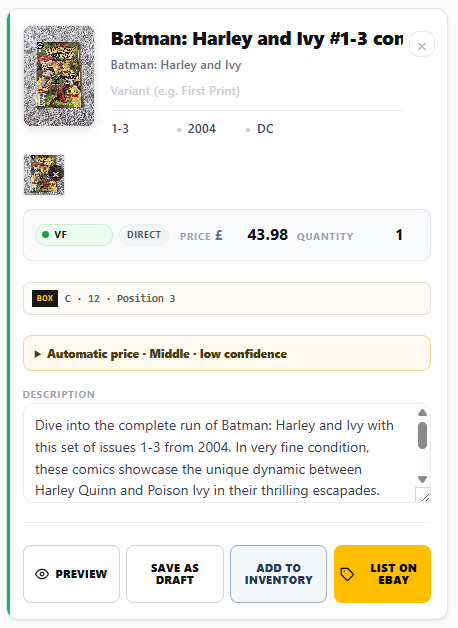
Confirm issue, variant, condition prompts and suggested price. Comicz creates a starting point; your team remains responsible for the final record.
Carry room, rack, box and sequential position into the listing card so the comic can still be found after the intake session ends.
Save reviewed work to permanent Fantasy Road Pro inventory, publish through the supported eBay workflow, or prepare a Whatnot-ready export.
Built around real boxes
Separate repetitive photography from careful review. Configure the box and starting position, switch between raw, slab, series and collected-edition scans, and retry only failed queue items.
Read the Long Box guide →Fantasy Road Pro inventory keeps the operational record for a physical comic, including SKU, quantity, location, status and supported cost or sale fields across authorised devices.
Read the inventory guide →Print a QR label for a populated box and reopen its stocktake from the shelf. Reconciliation records expected, found, missing and unexpected items without silently changing permanent stock.
Read the stocktake guide →Prepare comic-specific listing fields and photographs for the supported eBay connection or a Whatnot CSV handoff. Comicz does not treat an AI match or price as permission to publish unchecked.
Read the eBay listing guide →Choose it for the right job
Comicz is a comic intake, inventory and listing workflow. It does not claim to replace your accounts, till or every marketplace portal.
Direct eBay publishing depends on the supported account connection. Whatnot and other named marketplace profiles may be export handoffs rather than direct publication. Always verify the destination account, policies, condition and final price.
Team workspaces are in controlled rollout. Eligible enabled accounts can use named roles and review handoffs without sharing a password or licence key; their presence in documentation does not mean they are active for every customer today.
Bring back-room intake, shelf locations, review and marketplace preparation into one comic-specific workflow.
Process mixed long boxes methodically while preserving box position and keeping uncertain matches in review.
Reduce repetitive listing entry while keeping a person responsible for identity, condition, photographs and price.
Professional dealer pilot
Apply for a scoped paid pilot covering team intake, stock locations and listing preparation. Agree pricing and support first, then compare time per reviewed item and support effort after 30 days.
Apply for the dealer pilotStart with a real box
Explore Comicz with 5 starter scans. No payment card and no automatic renewal.

Fantasy Road Ltd 2026 ©️ Registered in England and Wales (Company Number: 13507222). Registered office: 167-169 Great Portland Street, London, England, W1W 5PF